The New Chessiro Game Review, Explained
By Chessiro
Last updated August 5, 2026
We rebuilt game review from the ground up. Here is everything in it — including the AI coach that highlights moves in its text — and how each piece is meant to be used.
Most chess analysis tells you a move was bad. Very few tools tell you why, and almost none tell you what to do about it. You finish the review knowing your accuracy was 78% and still have no idea what to practise tomorrow.
That gap is the reason Chessiro exists, and over the last few months we rebuilt game review around closing it. This is a tour of everything in it — what each tool does, and how it is meant to be used.
How the analysis works
Every move is analysed by Stockfish 19, the strongest open-source chess engine there is. It runs in your browser rather than in a queue on our servers, which matters for two reasons: your review starts immediately, and we can afford to make it free and unlimited. There is no one-review-per-day cap on Chessiro.
Getting a game in takes one step. Paste a PGN, upload the file, or connect your Chess.com or Lichess account and import games directly — bullet, blitz, rapid or classical, online or transcribed from over the board. Games you play against Chessiro's bots flow into the same review. You do not need an account to review a single game.
Move classifications: what each move was worth
Every move gets a label, from genius and smart at the top through best, good and book, down to inaccuracy, mistake and blunder. The bands are based on how much win probability a move gave away rather than raw centipawns, which is a closer match to how much a move actually cost you in a real game.
Crucially, the scale runs both ways. Plenty of tools only mark your errors, and a review that shows nothing but red teaches you very little. Seeing the strong moves you did find is what tells you which parts of your game already work. If the difference between the error bands is not obvious, we wrote a guide to blunders, mistakes and inaccuracies.
Chessiro Coach: an explanation for every move
The coach sits beside the board and comments on each move as you step through the game — not a label, a sentence. What the move threatened, what it gave up, what your opponent should now be worried about. It reads the engine's analysis of your actual position and turns it into something you can act on.
Six things make it more than a caption generator:
- Ask it anything about the position. Type a question about the move in front of you and you get an answer about that exact position — and the coach draws arrows on the board to show what it means, so you are looking at the idea rather than decoding notation.
- Highlighted moves inside the coach text. When the coach names a move or square — “the e4 pawn”, Nf3, a weak e5 square — that word is highlighted in the explanation itself. Hover or tap the highlight and the same squares light up on the board, so you can follow the idea without translating notation in your head. Colours carry meaning too: green for strong or best moves, red for mistakes and blunders, and yellow for key squares and other mentions.
- Suggested follow-up questions. If you do not know what to ask, it offers the questions worth asking here: why was this a blunder, what should I have played instead, how do I spot this earlier.
- Voice mode. The coach reads its explanations aloud as you move through the game. Listening to a game being explained is a very different experience from reading a wall of text.
- 24 languages. Switch the coach to the language you actually think in. Every one is voiced, so audio works in all of them, and chess notation stays in standard algebraic form.
- Training prompts in context. When a move points at a recurring weakness, the coach surfaces a prompt to practise that topic — so the insight becomes a rep instead of a note you forget.
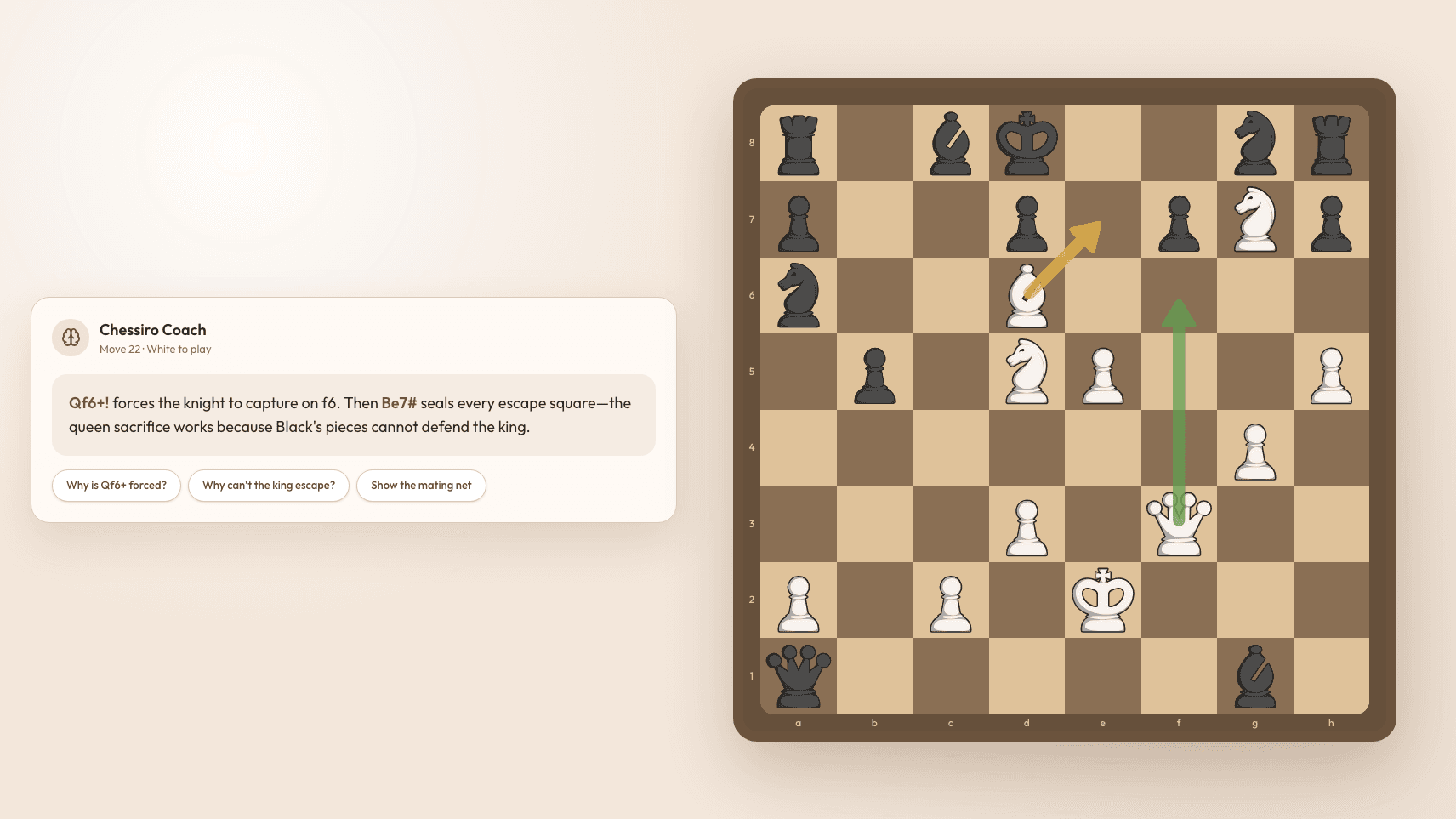
One more small touch people notice quickly: chess terms in the coach's text are underlined. Hover or tap one and the definition appears from our chess glossary without leaving the position. If it says your rook is on a half-open file and you are not certain what that means, you find out in one tap. Together with the move highlights, the explanation stays tied to the board instead of floating as abstract notation.
Recommended Training: insight instead of raw data
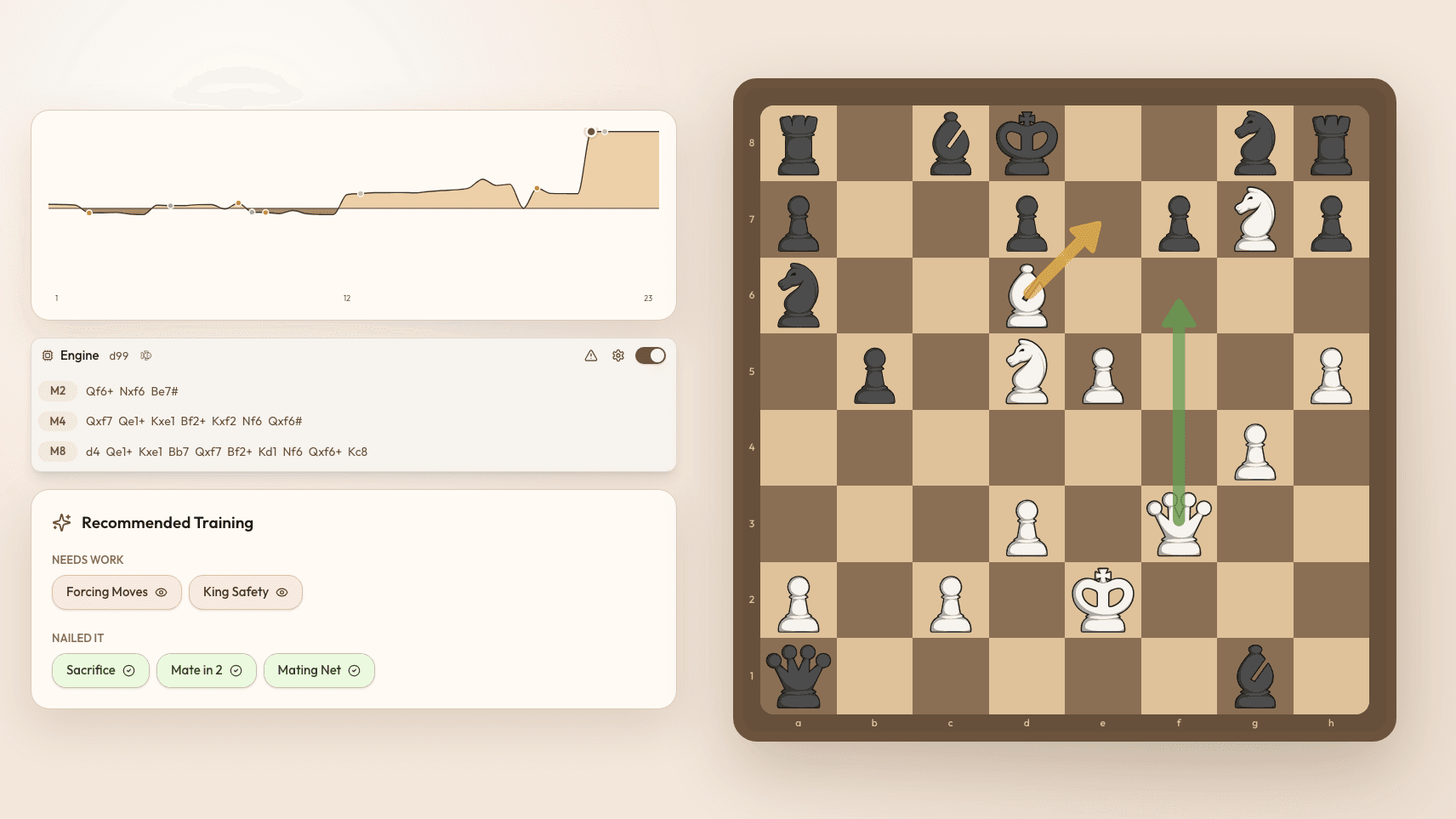
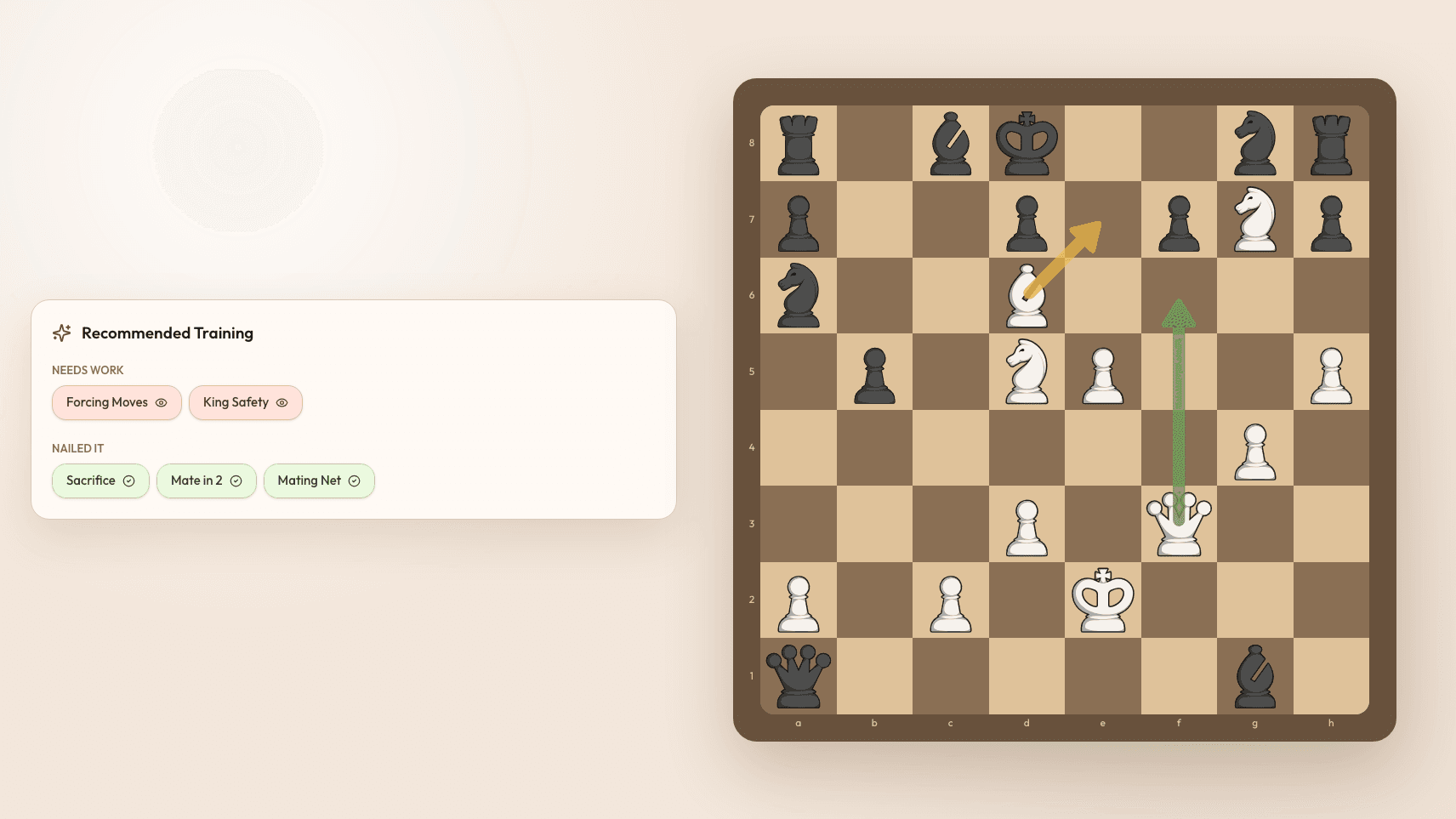
An accuracy percentage does not tell you what to practise. So the review also names the themes you missed in the game and the themes you handled well — not statistics, but ideas: a fork you did not see, a pin you walked into, a back-rank weakness, an endgame you converted cleanly.
Every theme is clickable. Open one and you get a definition plus a visual demonstration of the pattern, so an unfamiliar term becomes something you can picture. From there you can train that exact topic in one click, or learn it properly from a lesson (that part is coming soon). A review should end with something to do, not something to read. If finding your weak spots is the whole reason you review, our guide on finding and fixing chess weaknesses goes deeper.
The evaluation bar, in plain English
Every analysis tool has an evaluation bar. Ours will also just tell you who is better in words, move by move, because “+1.4” means nothing to most players until someone explains it. Prefer the number? Switch it with one tap and read the precise evaluation instead.
The move list beside it carries two more things worth having: the classification of every move, and how much time each player had left at that point. Time pressure explains an enormous share of mistakes, and seeing the clock next to the blunder usually explains it faster than the engine does.
The evaluation graph
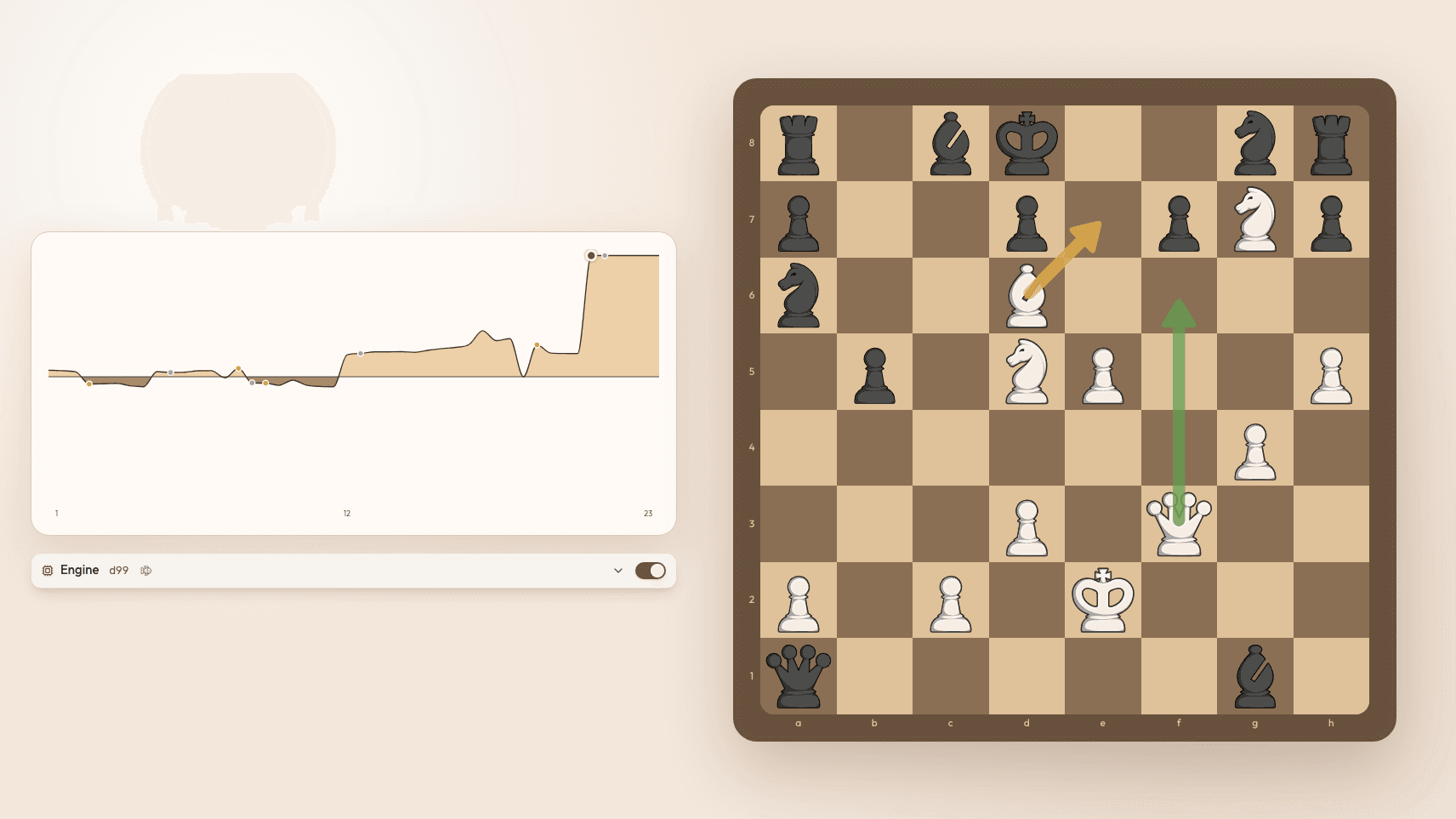
The graph is the shape of the game in one picture: who was in control, when that changed, and how sharply. Key moments are marked on it directly, so mistakes, blunders and standout moves are visible without scrubbing the move list. Click any peak or cliff to jump straight to that position.
The time graph
The time graph puts both players' thinking side by side, so you can see who burned their clock and where. Each bar is coloured by the quality of the move it produced, which makes an uncomfortable pattern easy to spot. Long think, bad move, repeatedly, is a different problem from moving too fast — and it needs a different fix.
Engine lines, with the controls you actually want
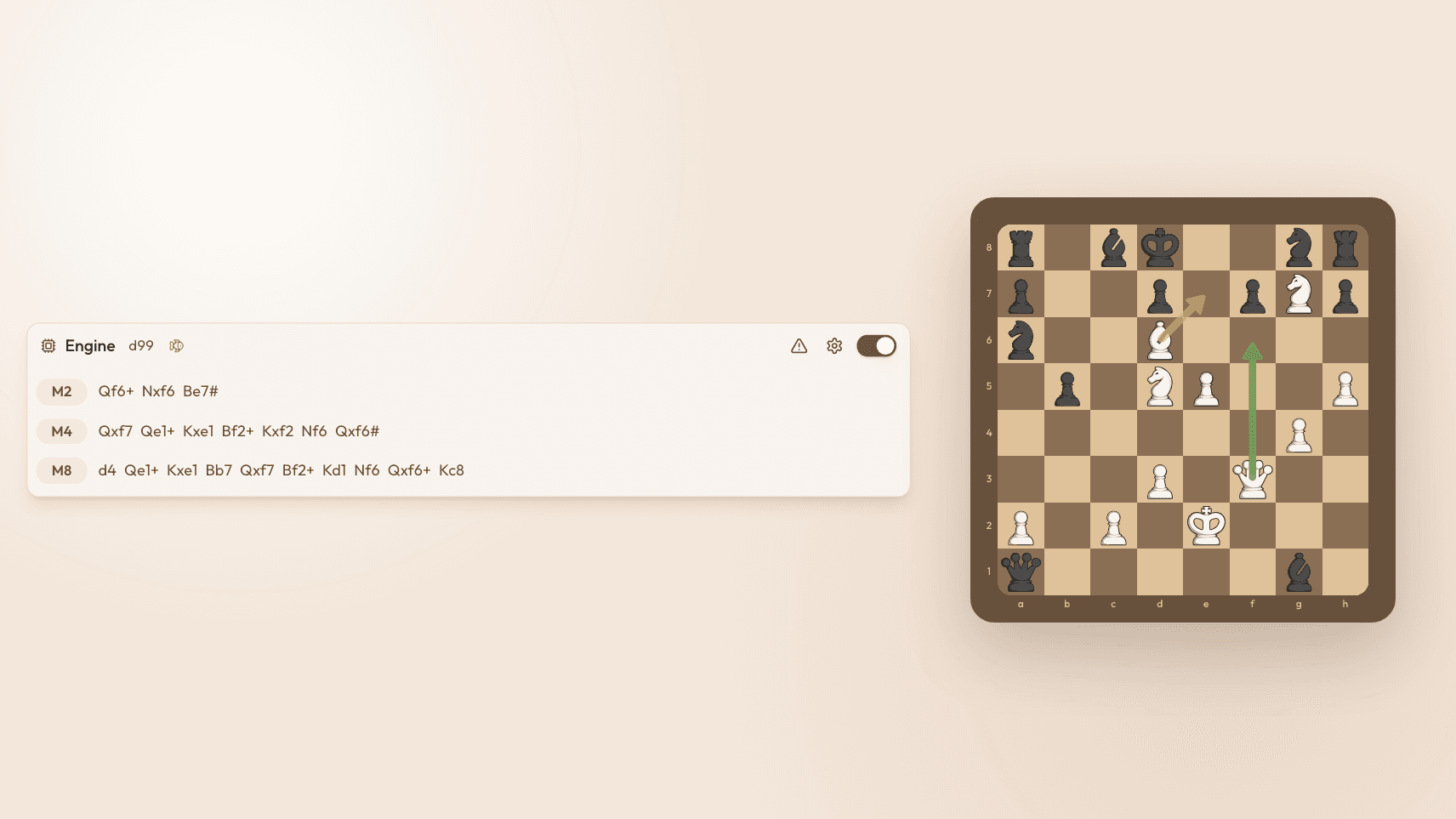
Under the board are the engine lines: the candidate moves Stockfish is considering, and how they compare. You can adjust the depth to trade speed for certainty, change how many lines are shown, toggle a view of the threats coming next, and hover a line to preview those moves on the board before committing to reading it.
The report tab: both players, side by side
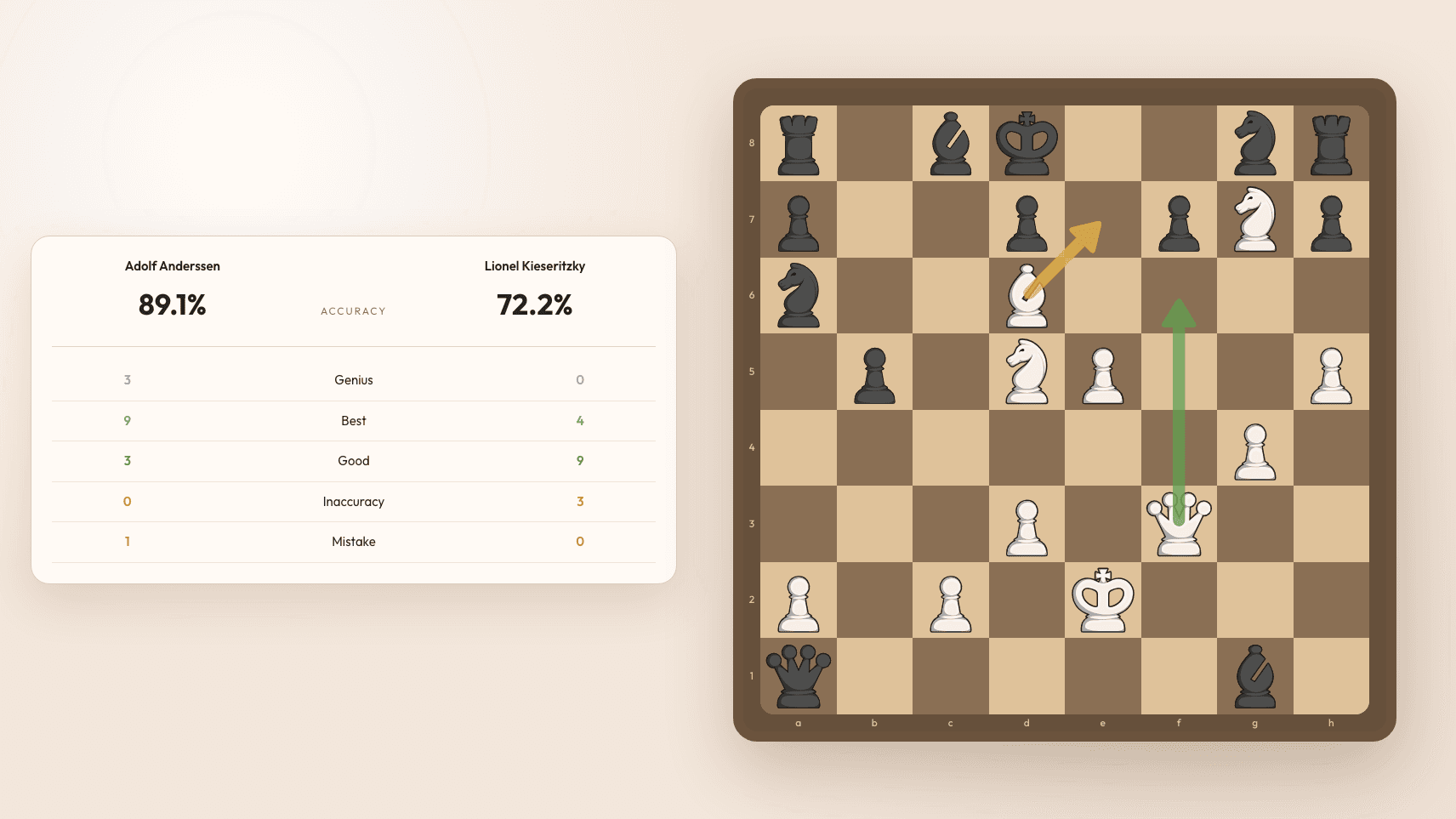
The report is the summary you screenshot and send to a friend. It compares White and Black across:
- Accuracy and estimated rating — who played closer to best play, and what playing strength that suggests.
- Move quality counts — how many genius, smart, best and good moves each side found, with a click to jump to any of them.
- Time management — average time spent on accurate moves versus inaccurate ones. If you think longer before your worse moves, that is worth knowing about yourself.
- Your longest think — the single move you spent most time on, and whether it was worth it.
- Premoves — how many you played, if any.
- Phase breakdown — a graph of who was stronger, in both accuracy and time, across the opening, middlegame and endgame. This is often the most useful panel on the page: it tells you which third of the game is costing you rating.
The opening database: 2.9 million real games
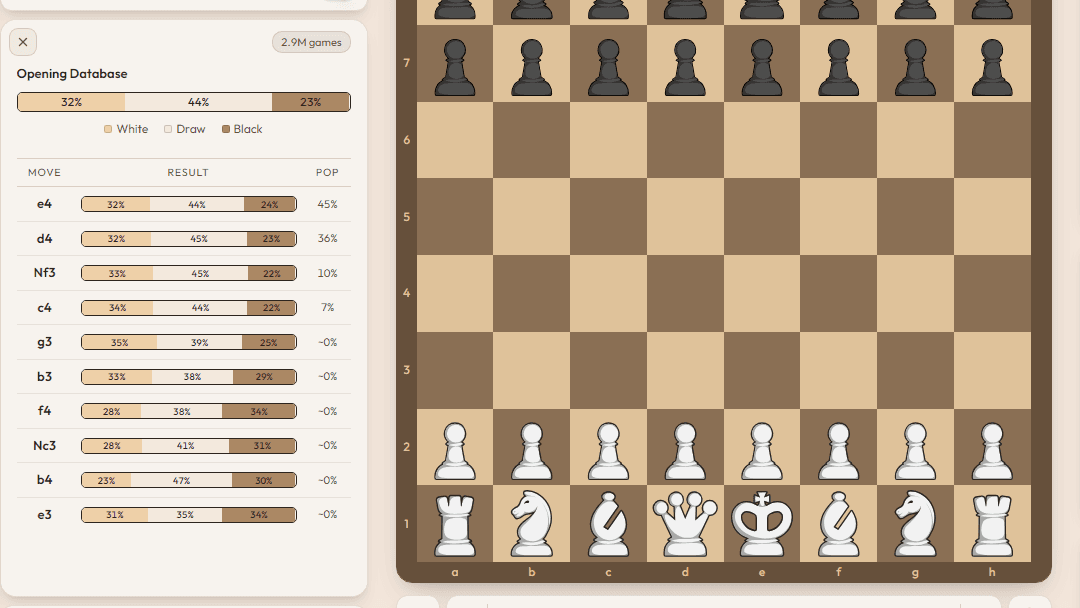
At any position you can open the opening database and see what happened when other players reached it: how many won, lost and drew from there, which moves they played next, how popular each move is, and how each one scored. It turns “I think this is theory” into something you can check in five seconds.
For the wider view — studying an opening as a whole rather than one position — our chess openings guide covers the same ground by variation, and how to learn chess openings covers how to study them without memorising twenty moves of theory.
Play out your own ideas
You are not limited to the moves that were played. Make your own moves on the board to explore a variation, and the coach explains those moves too — so “what if I had taken with the other rook” gets a real answer instead of a shrug. You can also tune the look and feel of the board, piece set and colours included, since you are going to be staring at it for a while.
What to actually do with a review
A tour of features is not a method, so here is the short version. Open the report first and find which phase cost you most. Jump to the two or three key moments on the evaluation graph rather than reading all forty moves. At each one, guess before you look, then ask the coach why your idea was worse. Finish by starting one training session on the theme the review named. Ten focused minutes beats an hour of clicking through.
Our practical checklist for analyzing a chess game expands that into a full routine.
Try it on your next game
Reviews are free and unlimited — no daily cap, no card. Paste a PGN or import from Chess.com or Lichess and analyze a game now, or read more about what the free game review includes first.
Frequently asked questions
What does Chessiro's chess game review include?
Stockfish 19 analysis of every move, a classification on each move from genius down to blunder, an accuracy score with an estimated rating, an evaluation bar you can read in plain English, an evaluation graph and a time graph with key moments marked, adjustable engine lines, a report comparing both players, an opening database of over 2.9 million games, and an AI coach that explains each move, highlights moves and squares inside its text, draws board arrows, and answers follow-up questions.
Is Chessiro's game review free?
Yes, and unlimited. There is no one-review-per-day cap. Stockfish runs in your browser rather than in a server queue, which is a large part of why we can give the analysis away.
How do I analyze a chess game online?
Paste the PGN, upload the file, or connect your Chess.com or Lichess account to import games directly. The review runs immediately and you can step through it move by move. You do not need an account to review a single game.
Can I ask the AI chess coach questions about a position?
Yes. Type a question about any move and the coach answers about that exact position. Moves and squares named in the reply are highlighted in the text — hover or tap one to light it up on the board — and the coach can also draw arrows so you see the idea, not just the notation. It suggests follow-up questions, can read its answers aloud, and speaks 24 languages.
How does Chessiro highlight moves in the AI coach text?
When the coach names a move or square — for example e4, Nf3, or a weak e5 square — that token is highlighted inside the explanation. Strong or best moves show in green, mistakes and blunders in red, and key squares or other mentions in yellow. Hover or tap a highlight to see the same squares on the board.
Does the review tell me what to train next?
Recommended Training lists the themes you missed in the game and the ones you handled well. Each theme opens a definition and a visual demonstration of the pattern, and you can start training that exact topic in one click.
How many games are in Chessiro's chess opening database?
Over 2.9 million real games. At any position you can see how often White won, lost or drew from there, which moves players chose next, how popular each one is, and how each move scored.

Free game review
Review your games and get actionable insights
Paste a PGN or import your Chess.com and Lichess games, and get a free move-by-move review: every mistake classified, every turning point explained in plain English, with training puzzles built from the exact positions you misplayed.